Project Management

Run the whole job in one place

Project management built for general contractors. RFIs, submittals, schedules, change orders, pay applications, drawings and e-signature — connected, so a change on one shows up everywhere it matters. One flat price for your whole company, with unlimited team members.

Key Features

Gantt schedules with critical path, baselines and a 3-week look-ahead

Built-in e-signature — owners and subs sign from any device, no account needed

RFIs and submittals with ball-in-court, due dates and email to the design team

Change events → proposals → change orders, posted straight to the budget

AIA-style pay applications (G702 / G703) from your schedule of values

Subcontracts, purchase orders, sub invoices and lien waivers in one ledger

A folder for every sub on the job, with monthly billing periods they submit their own pay applications to

Drawing sets with markups, revision compare and sheet history

Specifications split by section, with a submittal register from the spec

Daily logs that pull in your crew's Daily Report, with a monthly PDF

Punch lists and inspections with photos, pins on drawings and sign-off

Insurance, bonds, certified payroll and DBE compliance tracking

Letters on your letterhead, transmittals and meeting minutes

Document library with folders, versions and full-text search

"Waiting on you" inbox, email digests and ⌘K search across every record

Works on the phone — photos, punch items and approvals from the field

Team sharing on every plan — everyone you give Project Management works in the same records, updated live

Flat platform pricing — unlimited team members, no per-seat fees

Inside Project Management

Schedule

A schedule your whole team can read

Build the plan in a grid or drag it on the Gantt. Critical path, float and baselines are calculated as you go, and a three-week look-ahead is one click away.

  • Import from Microsoft Project or Primavera P6, export back anytime
  • Share a live, read-only schedule with the architect or owner
  • Edit together on every plan: see teammates' changes live and who's viewing, with no overwritten edits
  • Subs get an email when their dates move — your crew's Daily Report updates % complete
  • Every PDF export is print-ready on Letter to ARCH D
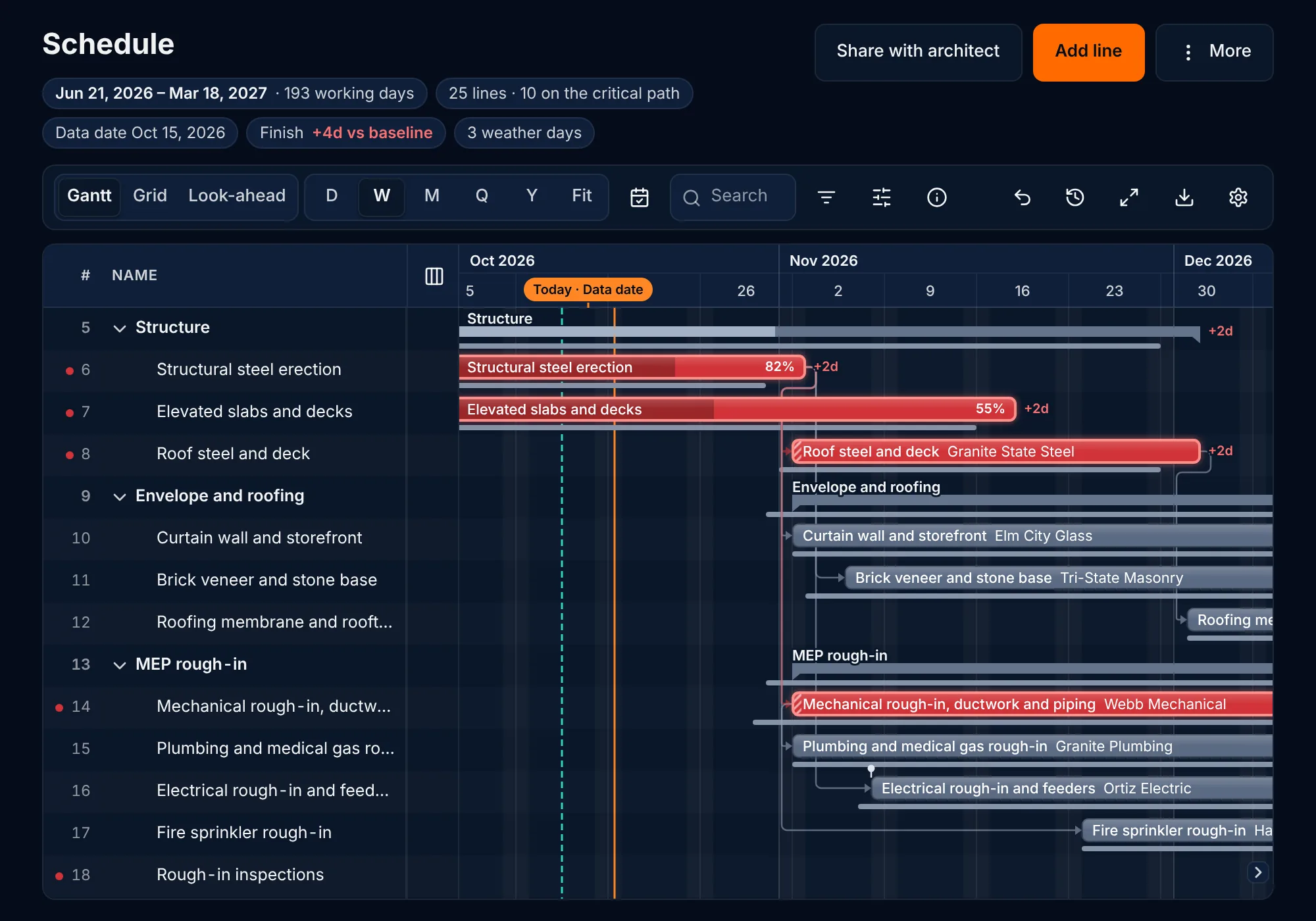
The Gantt workspace for the Riverside Medical Office Building: a toolbar with view, zoom, search and undo, a table of numbered phase and line rows beside the timeline, critical-path bars in red, a thin baseline bar beneath each line, a marker for the data date and variance labels such as +2d showing how far a line has slipped.

Coordination

Know whose move it is

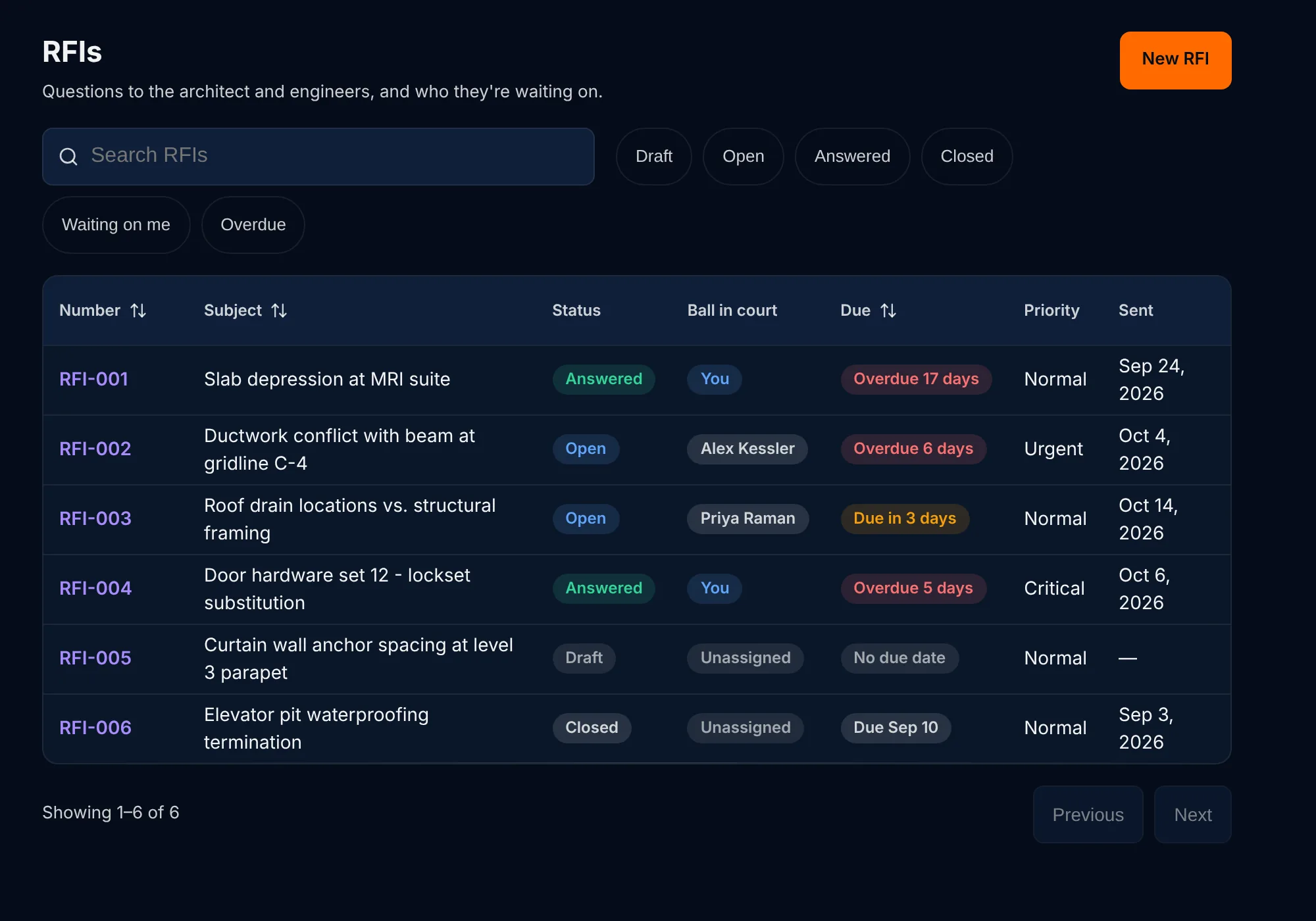
Every RFI, submittal and change order shows who has the ball and when it's due. Records go out by email from Bildgaard, and answers come back to the right place.

  • Submittal register built from your spec book
  • Meeting minutes that carry open items forward
  • "Waiting on you" inbox and a morning digest
The RFI log, listing each RFI with its status, who has the ball in court and a due date that shows overdue items in red.

Cost

Changes flow straight to the budget

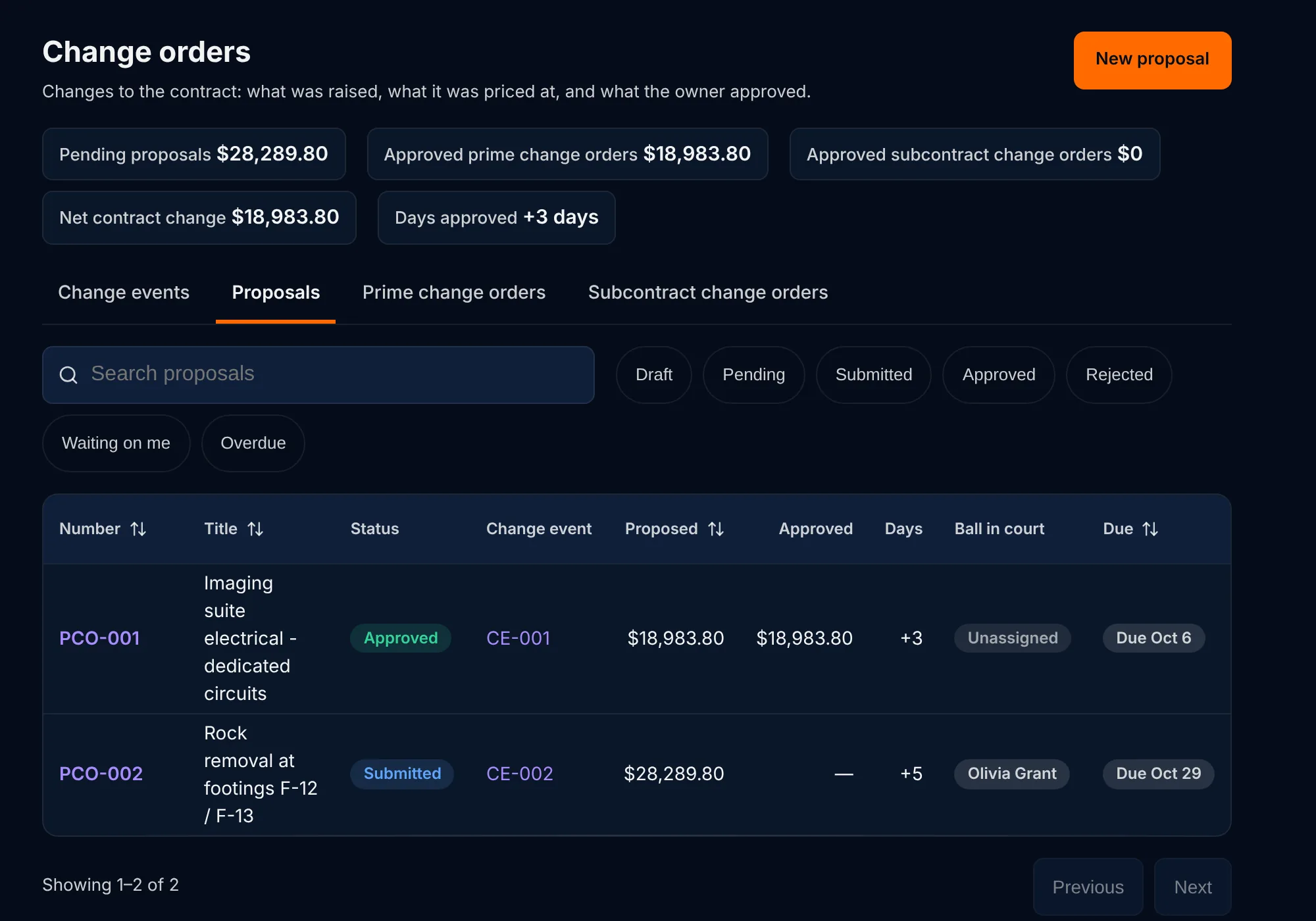
A change event becomes a proposal, then an owner change order and a subcontract change order. Approved amounts post to the budget, commitments and pay applications automatically.

  • Budget with committed costs and forecast to complete
  • AIA-style G702/G703 pay applications from the schedule of values
  • Sub invoices with lien waivers tracked per payment
  • Subs submit their own monthly pay applications, with insurance and certified payroll checked first
The change orders page, with totals for pending and approved changes and a table of proposals showing amounts, status and ball in court.

E-signature

Get it signed without another subscription

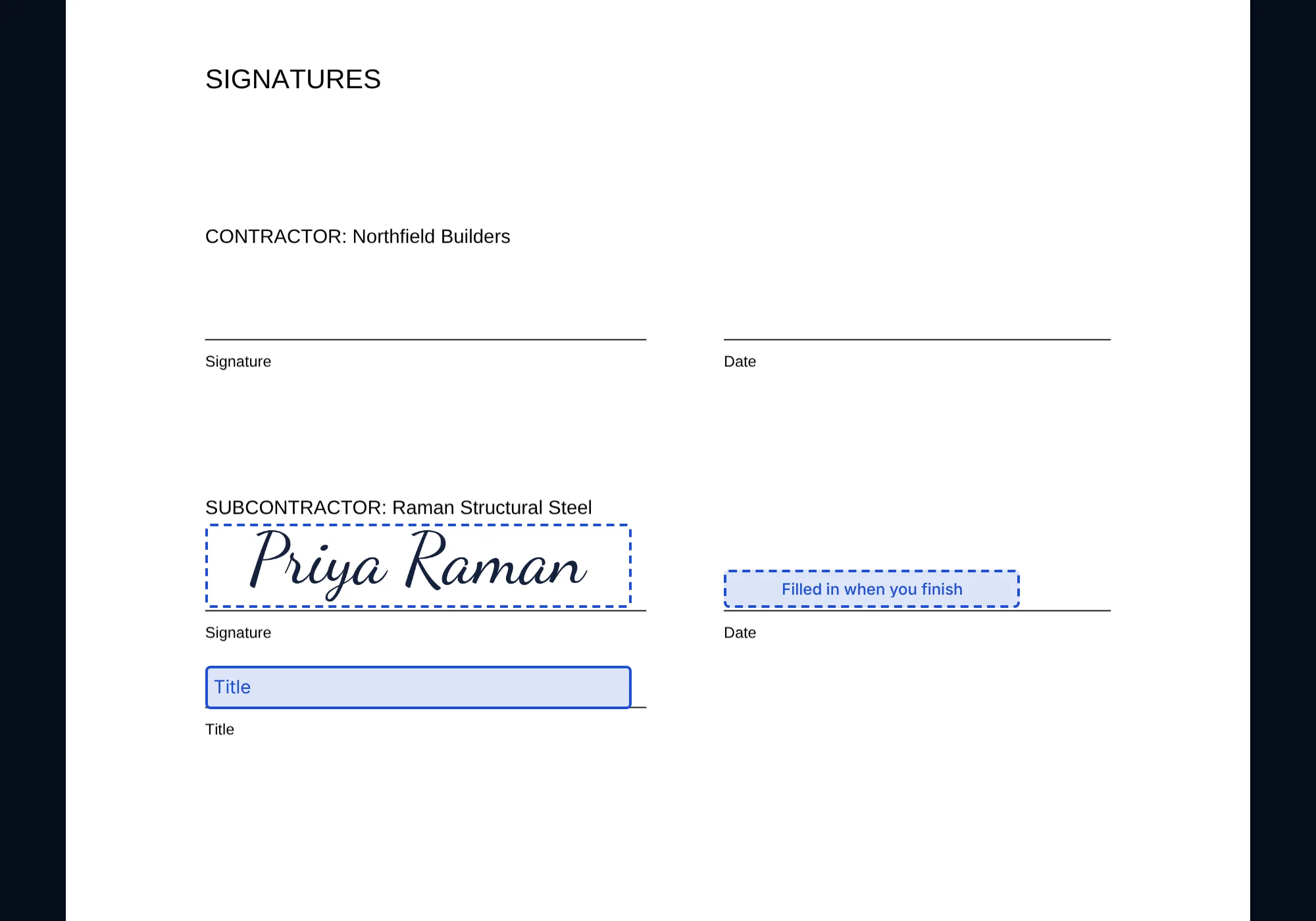
Send a subcontract, change order or lien waiver for signature right from the record. Signers don't need an account — they sign from the email on any device, and everyone gets the signed PDF with a Certificate of Completion.

  • Sign in order or all at once, with access codes and automatic reminders
  • Change orders and lien waivers move forward by themselves once signed
  • Signing templates for your subcontract agreement (Max)
The signing page for a subcontract agreement, with a typed signature adopted on the subcontractor's signature line and a date field filled in when signing finishes.

Field

Built for the job site, not just the office

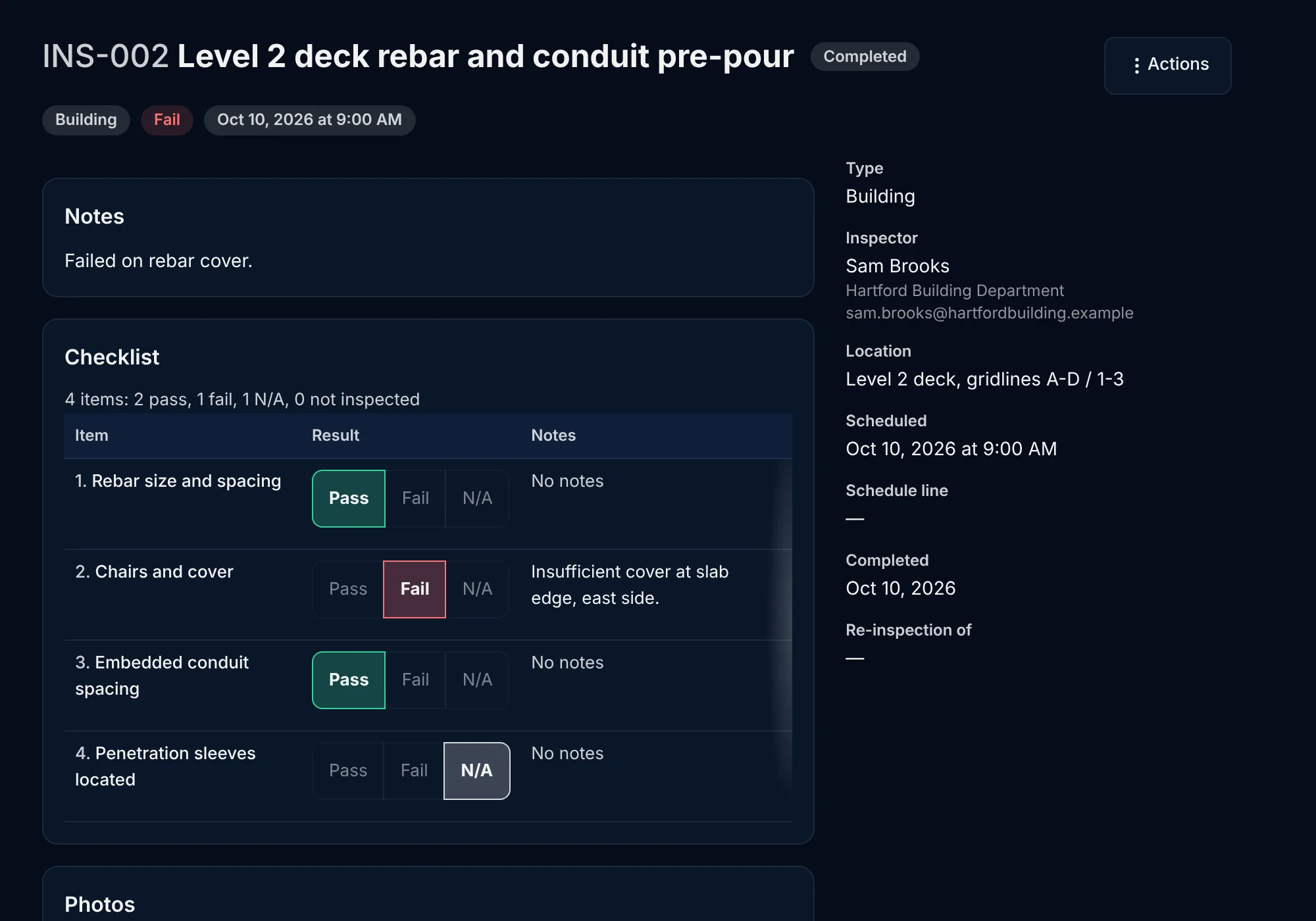
Daily logs pull in your crew's Daily Report. Photos, punch items and inspections are captured on the phone, pinned to drawings and signed off on site.

  • Punch lists with photos and drawing pins
  • Inspections with pass/fail checklists and re-inspections
  • A monthly daily-log PDF for the owner
An inspection record with a pass, fail or not-applicable result for each checklist item, the inspector, location and schedule details.

Documents

One home for drawings, specs and paper

Drawing sets with revision compare and markups, specs split by section, and a searchable document library with versions.

  • Letters on your letterhead and transmittals with delivery logs
  • Closeout packages assembled from what's already in the project
  • Scheduled reports emailed to your team every Friday
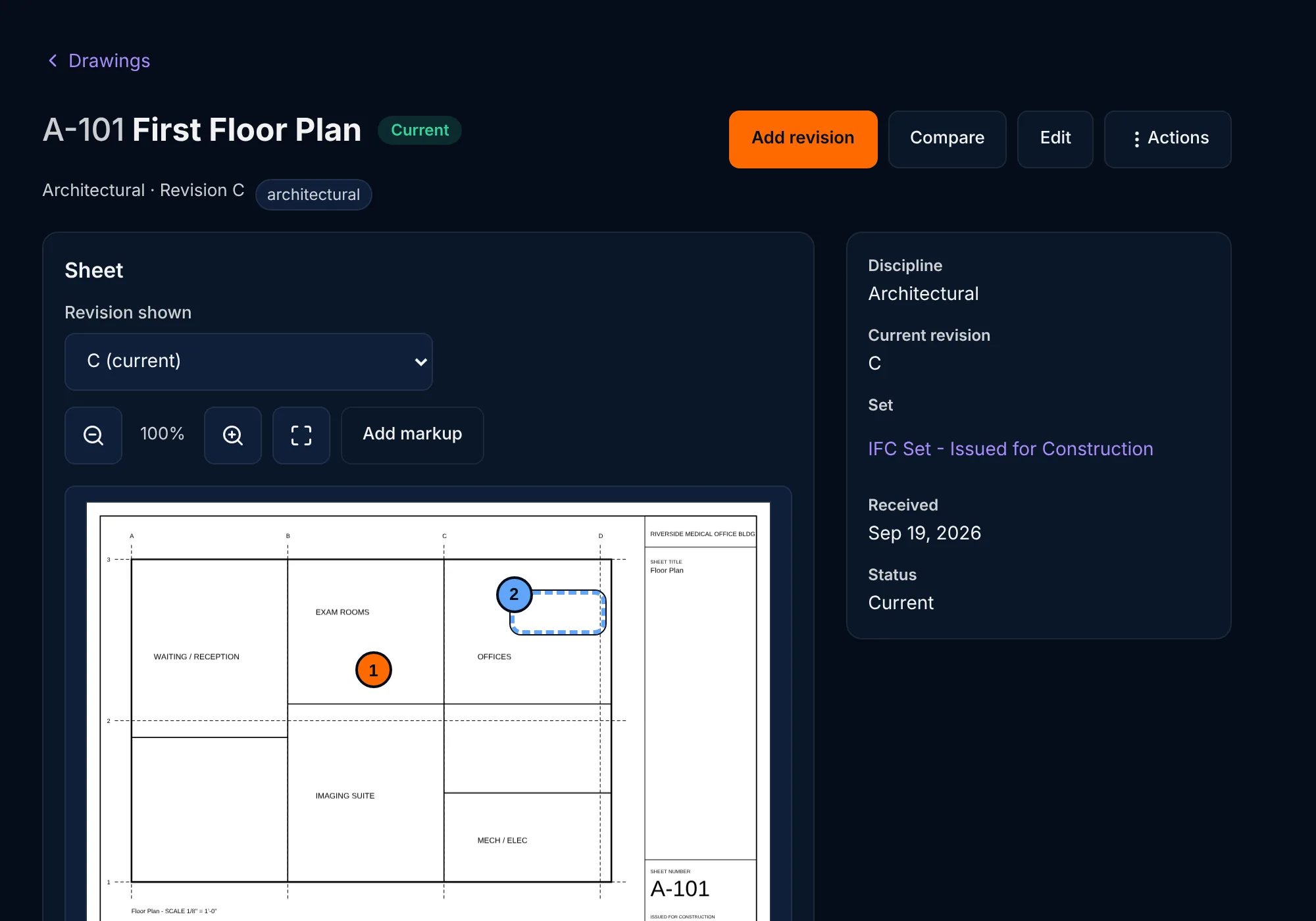
A floor plan sheet open in the drawing register, with numbered markup pins and a highlighted area drawn on the plan, beside the sheet's revision and set details.

Everything a GC needs, without the enterprise price tag

CompareBildgaardTypical construction platforms
PricingOne flat monthly price per companyPriced on your annual construction volume
UsersUnlimited team membersOften limited or extra per user
E-signatureBuilt in; signers need no accountA separate e-signature subscription
Getting startedStart a 14-day trial of every feature, no cardSales call and onboarding fees
Your field crewDaily Report and Timesheets connect to the same projectsSeparate field apps or add-ons

AI for the project manager

Each of these suggests or drafts and shows you what it proposes. Nothing in your project changes until a person accepts it.

AI drafting of RFIs from drawing markups

Drafts the subject, the question and a suggested answer from a markup on a sheet. You edit it before the RFI is created.

AI RFI thread summaries

Summarizes a long RFI thread into what was decided and what is still open. Nothing is saved.

AI change order reasons for change, from an RFI

Drafts a change's title and its reason from the RFI behind it, for you to edit before you save.

AI letters from templates and cited records

Drafts a letter from its template and the records it cites. You edit it before it is saved or sent.

AI matching of incoming correspondence to records

Suggests which RFIs, submittals, change orders and letters an incoming email or letter is about. Nothing changes until you act.

Insurance certificate reading

Reads an insurance certificate and suggests the dates and limits to fill in. You check them against the certificate.

AI schedule recovery options

When the finish date slips, suggests ways to get it back, such as overlapping work or adding crews, and shows what each would do. You choose which to apply, and every change can be undone.

AI schedule builder

Drafts a first schedule from your specs, your scope or a short description, so you start from a plan instead of a blank grid. You review it before it becomes the project schedule.

Progress and delays from the field

Reads your daily logs and Daily Report entries and suggests percent complete and delays for each schedule line. You accept or dismiss each suggestion.

Monthly schedule narrative

Drafts the month's schedule narrative from the schedule's progress and delays, ready for you to edit before it goes to the owner.

Ask AI to change the schedule

Type what you want in plain English, such as “push roofing 3 days later”, and see the changes and the new finish date before anything is saved. You apply or discard them, and Undo reverses them.

AI missing-logic fixer

Finds lines with no predecessor or successor, long lags and constraints standing in for logic, and suggests the links to add. You tick the ones to apply, and Undo reverses them.

AI durations from your company's history

Suggests durations for upcoming lines from how long similar work actually took on your company's other projects, citing the lines it matched. You choose which to apply.

Change detection

Flags RFIs, meeting minutes and daily logs that look like a change to the contract, so you can open a change event sooner. It only flags; you decide.

Meeting minutes from a recording or transcript

Drafts minutes and action items from an audio recording of the meeting or its transcript. You review and edit them before they are saved.

Photo tagging

Suggests captions and tags for site photos, with links to schedule lines and drawing locations, so photos are findable later. You confirm the ones you want.

Closeout O&M checklist

Drafts the operation and maintenance and warranty items to collect from each spec section, for you to edit into the closeout checklist.

AI submittal register from a spec section

Reads a spec section and lists the submittals it calls for. You tick the ones to file as draft submittals.

Project setup from a spec book

When a spec book is uploaded, proposes the project's details, each with the section it came from, and a first schedule that fits the contract time. You choose what to apply.

Weekly schedule change report

Lists what changed in the schedule this week and explains why, citing the delays, change orders and field progress behind each move. You review it, and can email it every Monday.

Delay impact analysis

Works out what a recorded delay does to the finish date and critical path, then drafts a time-extension justification from those numbers for you to check and send.

Schedule updates from meeting minutes

Reads a meeting's minutes and suggests the date moves, new lines, progress and delays they imply, each quoting the item it comes from. You tick the ones to apply, and Undo reverses them.

Procurement lines from the submittal register

Suggests submit, review, fabricate and deliver lines for long-lead submittals, timed from their lead times and linked to the work that installs them. You tick the ones to add, and Undo reverses them.

AI reads your subcontracts into the commitment, schedule & compliance

Reads a subcontract agreement and suggests its amount, schedule of values, dates, terms, schedule lines, insurance and bonds, closeout items and contact, each with the page it came from. You tick what to apply.

AI lien waivers from approved sub pay applications

When you approve a sub's pay application, reads the pay-through date from their invoice and drafts a conditional partial lien waiver for the approved amount, sent to the sub to sign. You can void it or make your own.

AI cost codes from your spec

Suggests the cost code for change orders, subcontract and purchase order lines from your own cost code list, matched through the project's spec sections. You can change any of them.

Turn any document into a template with AI

Upload a filled-in Word file or PDF and AI marks the project, subcontract and company details to fill. You check every field before it becomes a template.

Product Integration

Deeper Intelligence When Products Work Together

Bildgaard products share data, job sites, and context. The more products you connect, the more AI can cross-validate, detect anomalies, and surface insights that siloed tools simply can't match — and Dashboard AI ties it all together.

One Project List Across Bildgaard

TimesheetsDaily ReportProject ManagementEstimator

Create a project in Daily Reports, Project Management or Timesheets — or win a bid in Estimator — and it shows up everywhere. Clock-ins, crew shifts, daily reports and PM records all link to the same job, and your plan's project limit counts it once.

Won Bid to Project

EstimatorDaily ReportProject ManagementTimesheets

Mark a bid won and it becomes a company project in one click — ready for daily reports, RFIs and crew hours. If the job already exists, the bid links to it instead of creating a duplicate.

Why this matters

Most construction software is siloed — your daily report app doesn't know what your timesheet app knows, and your bid tracker can't talk to your estimating tool. We built them all, so our AI correlates data across every product in real time. Add Dashboard AI and you get unified anomaly detection, executive briefings, and business analytics that get richer with every product you connect.

Simple, Transparent Pricing

Choose the plan that fits your team. Max plans include a free trial.

Core

$149/mo

The full AIA document suite for your team

AIA Document Suite
Submittals with cover sheets, routing & revisions
RFIs with ball-in-court tracking & PDF
Change events, proposals & prime and subcontractor change orders, with a change log
Subcontract change orders with original contract, previous changes and new sum, in a standard change order form (PDF)
Pay applications (G702 / G703) with certify & pay
Meeting minutes & action items
Documents & Correspondence
Drawing register with sets, revisions & markups
Specifications: spec books split into sections, with section PDFs
Documents with folders, versions, zip downloads & search
Custom document templates you fill from a project or subcontract
Letters on your letterhead from templates
Transmittals with delivery logs
Field & Schedule
Project schedule & milestones
Real-time schedule collaboration: live changes, who's viewing & no overwritten edits
Comments on schedule lines with @mentions & file attachments
Board and calendar views of the schedule
Schedule redo and print
Saved schedule views
Baselines, variance, data date and work calendars
Schedule import & export in Excel (.xlsx)
Sub date-change notices by email
% complete from your crew's Daily Report
Assign schedule lines to a person, with an email, daily reminders & My items
Schedule health check
Late-submittal schedule warnings
Daily logs
Punch lists with photos, drawing pins & sign-off
Inspections with checklists & re-inspections
Photos library
Cost & Compliance
Budget with cost codes & postings
Budget forecasting
Commitments: subcontracts, purchase orders & invoices
Subcontract agreements from draft to executed, filed by subcontractor: pending on the budget until executed
One company subcontractor list shared with Estimator: contacts, insurance, agreements and every subcontract in one profile
A folder for each subcontractor on a job: agreements, insurance, lien waivers, change orders, pay applications, certified payroll and files in one place
Invite subcontractors to a project: they fill in their schedule of values and upload their COI, W-9 and other documents for your review
Monthly billing periods with a due date: subs get an invite email, reminders every 1, 2 or 3 days if you want them, and submit their own pay applications from a free login, with late ones flagged
Pay applications from subs check that their insurance is current, and for prevailing-wage jobs that certified payroll is attached, before they can submit
One-click lien waiver from an approved sub pay application, filled with the amount and the period end
Insurance certificates with expiry reminders
Certified payroll
Automated lien waiver tracking
Bond tracking
DBE / MBE / WBE compliance
Compliance reporting
Closeout checklist & owner package
Closeout package automation
Reports & Search
Open RFIs, submittals, change order log & budget summary as PDF / CSV
Scheduled report emails
My items & notifications
Search & the ⌘K command palette
Project directory
Capacity
Up to 3 active projects
Unlimited team members (flat pricing)
Shared Projects
Team sharing: everyone you give this product works from the same records, updated live
Projects shared with Daily Reports, Timesheets & Estimator
Won Estimator bids arrive as projects
Most Popular

Pro

$349/mo

Integrations & automation for busy GCs

Everything in Core, plus
Up to 15 active projects
Approval workflows with sign-off chains & typed signature on approval
Built-in e-signature: send contracts, change orders & lien waivers to sign — signers need no account
Send change orders for e-signature
Sign in order or all at once, with access codes, reminders & a Certificate of Completion filed in Documents
Gantt chart scheduling
Drag-to-edit Gantt chart with dependencies
Share a live schedule with the architect or owner
Schedule import / export (MS Project, P6)
Look-ahead schedules
Schedule update requests: subs update their lines by link (no login), you review & apply
Portfolio view: every project's schedule, milestones & overdue items on one page
Workload view of the schedule by responsible party
Custom columns & conditional formatting
Shared team views
Custom project templates
Automation
Drawing comparison & revision diff
Weekly look-ahead emails to subcontractors
Forecast weather risk on look-ahead lines
AI drafting of RFIs from drawing markups
AI RFI thread summaries
AI change order reasons for change, from an RFI
AI letters from templates and cited records
AI matching of incoming correspondence to records
Insurance certificate reading
Platform Integrations
Timesheet sync (labor to cost codes)
Daily Report sync (field to project record)
Priority support

Max

$699/mo

Enterprise project controls at scale

Unlimited Scale
Unlimited active projects
Everything in Pro
One-click change orders: the sub signs, you countersign, filed in their folder
Signing templates for subcontract agreements
AI schedule recovery options
AI schedule builder
Progress and delays from the field
Monthly schedule narrative
Ask AI to change the schedule
AI missing-logic fixer
AI durations from your company's history
Change detection
Meeting minutes from a recording or transcript
Photo tagging
Closeout O&M checklist
AI submittal register from a spec section
Project setup from a spec book
Weekly schedule change report
Delay impact analysis
Schedule updates from meeting minutes
Procurement lines from the submittal register
AI reads your subcontracts into the commitment, schedule & compliance
AI lien waivers from approved sub pay applications
AI cost codes from your spec
Turn any document into a template with AI
Enterprise Capabilities
Full API access & webhooks
SSO / SAML
Custom integrations
White-label documents & portals
Dedicated account manager
14-day free trial
Time Is Money

See How Much Time You'll Save Every Week

Conservative estimates based on typical construction workflows. Most teams report saving even more.

Pro

$349/mo

~21 hrs/wk

saved vs manual processes

AI drafting of RFIs, letters & change reasons~5 hrs
Automated submittal & RFI logs~4 hrs
Change order & budget tracking~3 hrs
Pay application generation (G702/G703)~3 hrs
Certified payroll & lien waiver automation~3 hrs
Closeout package automation~3 hrs
Monthly ROI at $100/hr
~$8,400

24× return on your $349/mo investment

Best Value
Max

$699/mo

~30 hrs/wk

total saved (Pro + Max features)

AI schedule recovery options
~4 hrs
Approval workflows & Gantt scheduling
~3 hrs
Drawing comparison & revision tracking
~2 hrs
Monthly ROI at $100/hr
~$12,000

17× return on your $699/mo investment

Based on $100/hr fully-loaded cost for project managers, estimators, and field supervisors. Actual savings depend on team size and usage.

Questions, answered